
AI referrals: Who actually comes from ChatGPT to your website?
A number from our own analysis: inquiries arriving through our website increasingly name an AI as the trigger. "ChatGPT recommended you" appeared in not a single inquiry two years ago. Today the sentence is part of everyday business.
You see little of this in web statistics at first. AI visitors hide behind "Direct" and inconspicuous referrer entries. This post shows how to make them visible, and what to watch out for when interpreting the numbers.
Step 1: Set up the AI segment
Why does this need its own segment at all? Because the default channel groups of analytics tools do not know AI sources. GA4 files a click from ChatGPT as generic "Referral", between industry directories and partner links. Umami shows the referrers individually, but only grouping turns seven individual sources into one number you can track monthly and put into reporting.
The most important referrer domains for an AI segment, as of June 2026:
1. chatgpt.com and chat.openai.com (ChatGPT) 2. perplexity.ai (Perplexity) 3. claude.ai (Claude) 4. copilot.microsoft.com (Microsoft Copilot) 5. gemini.google.com (Gemini) 6. duckduckgo.com with AI answer parameters (DuckAssist) 7. search.brave.com (Brave Leo)
Important: this list goes stale quickly. Check your referrer reports quarterly for new AI domains.
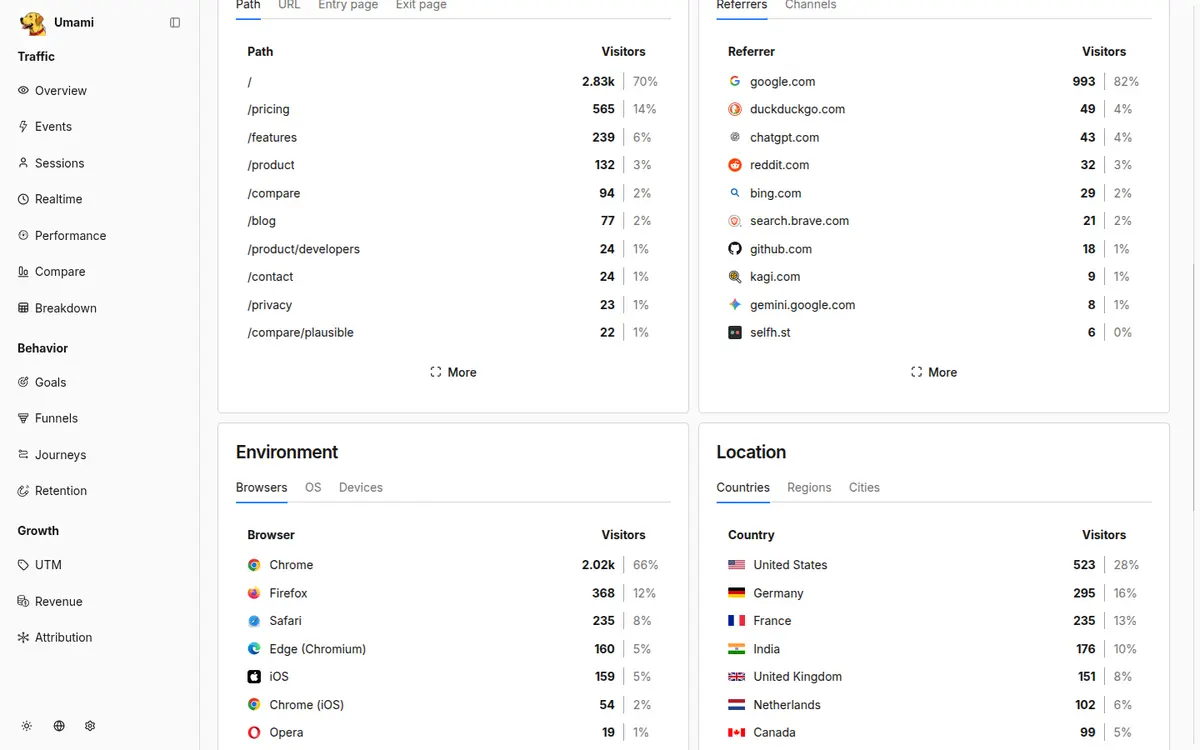
How to set up the segment in Umami:
1. Open your website's dashboard and switch to the Sources view. All referrers are listed individually there, as in the screenshot above. 2. Set a filter on the referrer, starting with chatgpt.com, and add the remaining AI domains from the list as further filter values. 3. Save the filter combination as a segment, for example under the name "AI referrals". 4. From now on, you open the segment with one click and see visits, entry pages and events for these sources only.
If you have set up conversion events, for example for submitted contact forms, you read the inquiry rate of AI visitors directly in the segment: events divided by visits. You will need this one number later to evaluate the segment.
And this is how it works in GA4 via a channel group:
1. Open Admin, then Data settings, then Channel groups, and create a new channel group. 2. Add a channel "AI referral" in it. Condition: source matches the regular expression chatgpt.com|perplexity.ai|claude.ai|copilot.microsoft.com|gemini.google.com. 3. Move the new channel above the generic referral channel in the ordering, otherwise the old assignment wins. 4. In reports, select the new channel group as a dimension; it also applies to past periods there.
One difference between the two worlds deserves a note: GA4 only counts visitors who consent in the cookie banner. Your AI segment suffers the same undercounting there as the rest of your traffic. Why we measure cookieless for that reason is covered in our post on cookieless tracking.
Step 2: Know the measurement gaps
Useful as the segment is, three gaps remain. Knowing them is what lets you read the numbers correctly.
Google AI Overviews are invisible. Clicks from them appear as normal Google traffic; there is no dedicated referrer. They can only be observed indirectly, for example via Search Console: impressions rise, clicks fall while the position stays stable.
Dark traffic. If someone opens your link from the ChatGPT app, a messenger or an email, the referrer is often missing entirely. These visits land under "Direct". The measured AI share is therefore a lower bound, never the true value.
Browser privacy. Safari and Firefox truncate referrers in many constellations or drop them. This too moves AI visits into the Direct segment.
One more distinction, because it often gets mixed up in conversations: the crawlers of AI providers that collect your content do not appear in these numbers at all. Web analytics counts browser visits by humans; crawlers execute no JavaScript and are only visible in server logs. The segment measures the harvest, not the sowing.
For practice this means: treat the segment numbers as a conservative lower bound and watch in parallel whether your direct traffic and your brand searches grow along with it.
Step 3: Read the numbers correctly
Four rules from our consulting practice:
Do not confuse volume with value. On the websites we manage, AI referrals so far make up single-digit percentages. But the visitors arrive with a pre-selection: the AI has already told them you fit their question. Dwell time and inquiry rate in this segment are correspondingly higher.
Factor in the invisible effect. Many users read the AI answer, do not click, and later type your company name directly into the search field or the inquiry. So watch brand searches in Search Console in parallel.
Identify the cited pages. Look at which pages AI visitors land on. Those are your citable contents. Building more of them is more effective than polishing homepage copy (why, is explained in the post on AI visibility).
Trend over absolute value. The interesting question is not whether the segment is 3 or 5 percent today, but how steep the curve is. In our projects the share roughly doubles every six to nine months.
A worked example: what the numbers look like in practice
An illustrative example with invented but realistic numbers for a mid-sized B2B website. The month brings 12,000 visits. The AI segment counts 420 visits, so 3.5 percent. Half a year ago it was 180.
The inquiry rate across the whole website is 0.8 percent, in the AI segment 2.5 percent. So of the 420 AI visits, around ten become inquiries; of the remaining 11,580 visits, about 93.
The reading, following the four rules above: the segment delivers only every tenth inquiry so far, but is roughly three times as valuable per visitor and has more than doubled in six months. The action here would be: look at the segment's entry pages, build more content of that type, watch brand searches in Search Console.
Just as important is what you should not read from these numbers: a reason to pull budget from the channels that bring 90 percent of inquiries today. The AI segment deserves attention and targeted content, not yet a reallocation.
From what share should we act?
There is no fixed threshold; as orientation from our consulting practice: below 2 percent, observe; from about 5 percent, invest deliberately, for example in citable content and FAQ structures. In between, the trend decides. If the segment grows clearly over two quarters, the earlier start pays off, because new content takes months before AI systems cite it.
Does Bing/Copilot count as an AI source?
Visits with the referrer copilot.microsoft.com clearly belong to the AI segment, because the click came from an AI answer. Clicks from classic Bing search remain normal organic traffic, even though Bing displays AI elements. The line runs not at the provider but at the question of whether a generated answer triggered the click.
How do we distinguish an AI referral from a normal referral?
Via the referrer domain from the list above: chatgpt.com as the source means the visitor came from a ChatGPT answer. The risk of confusion runs rather in the other direction, because AI visits without a referrer land under "Direct". If your direct traffic rises in parallel with the AI segment, that is an indication of additional, invisible AI visits.
Your next step
Set up the segment and after four weeks look at three numbers: share of traffic, inquiry rate of the segment, and the most visited entry pages. These three numbers tell you whether AI visibility is already a revenue topic for your company or still a watching brief.
If you would rather not build the analysis yourself: in the Future Check we set up the segment for you and deliver the first interpretation along with it.
Go deeper in our knowledge base
Want to know what these topics mean for your company? The Future Check shows you the biggest levers within 2–4 weeks.