Cookieless tracking 2026: why we rely on Umami
This post has a backstory. In 2020, we compared the web tracking tools of the day in the old arocom blog, from Adobe Analytics to Google Analytics. The article was read steadily for six years. Since then, its core assumption has flipped: that tracking naturally sets cookies and a consent banner is part of the deal.
Today the opposite is true. The best data goes to those who skip personal tracking. This comparison shows why that is and which tool fits which company.
The tools compared: GA4, Matomo, etracker, Umami
| GA4 | Matomo | etracker | Umami | |
|---|---|---|---|---|
| Cookieless possible | limited | yes (configurable) | yes | yes (always) |
| Consent banner required | yes | depends on setup | no (default setup) | no |
| Hosting | Google Cloud (US) | self-hosted or cloud (EU) | Germany | self-hosted or cloud |
| Costs | free (your data is the price) | from €0 (self-hosted) | from approx. €19/month | from €0 (self-hosted) |
| Target group | marketing teams in the Google ecosystem | data sovereignty + feature depth | shops, GDPR focus | clear KPIs without ballast |
| Complexity | high | medium | medium | low |
We deliberately left out the enterprise class (Adobe Analytics, Piano Analytics). If you need attribution across ten channels and AI-supported forecasts, and have the budget to match, that is still the right place. For most mid-sized corporate websites it is overkill.
Why we chose Umami
Our own website has run on self-hosted Umami since the relaunch. Three reasons tipped the scales:
First, the banner question. Without tracking consent, our website needs no analytics banner. That improves the user experience and the data quality at the same time.
Second, data sovereignty. Umami runs on our own server in Germany. There is no third party processing our visitor data for its own purposes.
Third, focus. Umami answers the questions that actually appear in management reports: how many visitors, from which sources, which content works, how many contact requests. Events and funnels also cover conversion paths. Whatever is missing, we have not missed it in two years.
An observation from client projects: the most common objection to switching is not functional, it is habit. GA4 dashboards feel familiar, even though hardly anyone uses more than four reports.
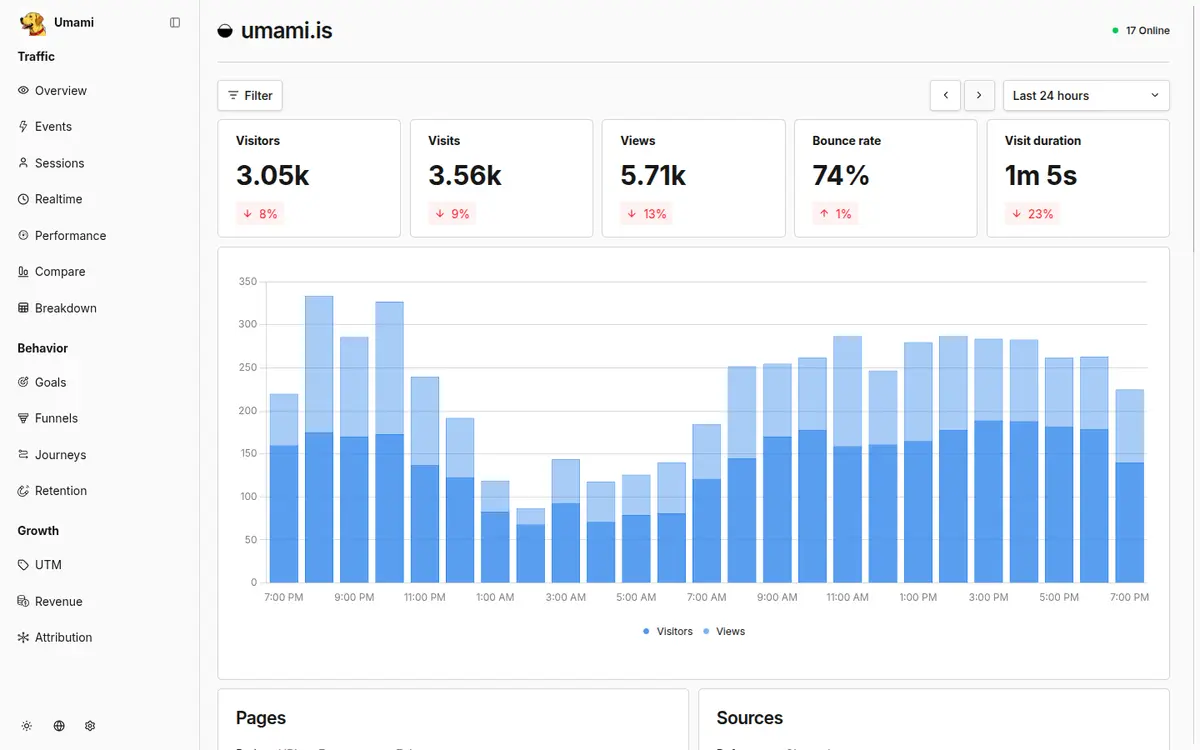
The screenshot shows what you see after logging in. Four metrics sit at the top of the dashboard: visitors, page views, bounce rate and visit duration, each compared to the previous period. Below them you find the trend over time and the most visited pages.
In practice, this single view is enough for a monthly report. It answers the standard management questions in a minute: are visitor numbers trending upwards? Which content draws people in? Do visitors stay or do they bounce?
What you do not see here: sampling notices, thresholds or modelled estimates for visitors without consent. The numbers are complete because no banner stands in the way. In client meetings, this is usually the moment when the discussion about data quality ends.
The sources view: where your visitors come from
The second view that actually appears in reports is the sources list. It lists every referrer individually: Google, Bing, LinkedIn, linking industry portals. For a good two years now, AI systems have appeared there as well. In our own instance and in client projects, we now regularly see chatgpt.com among the most important sources.
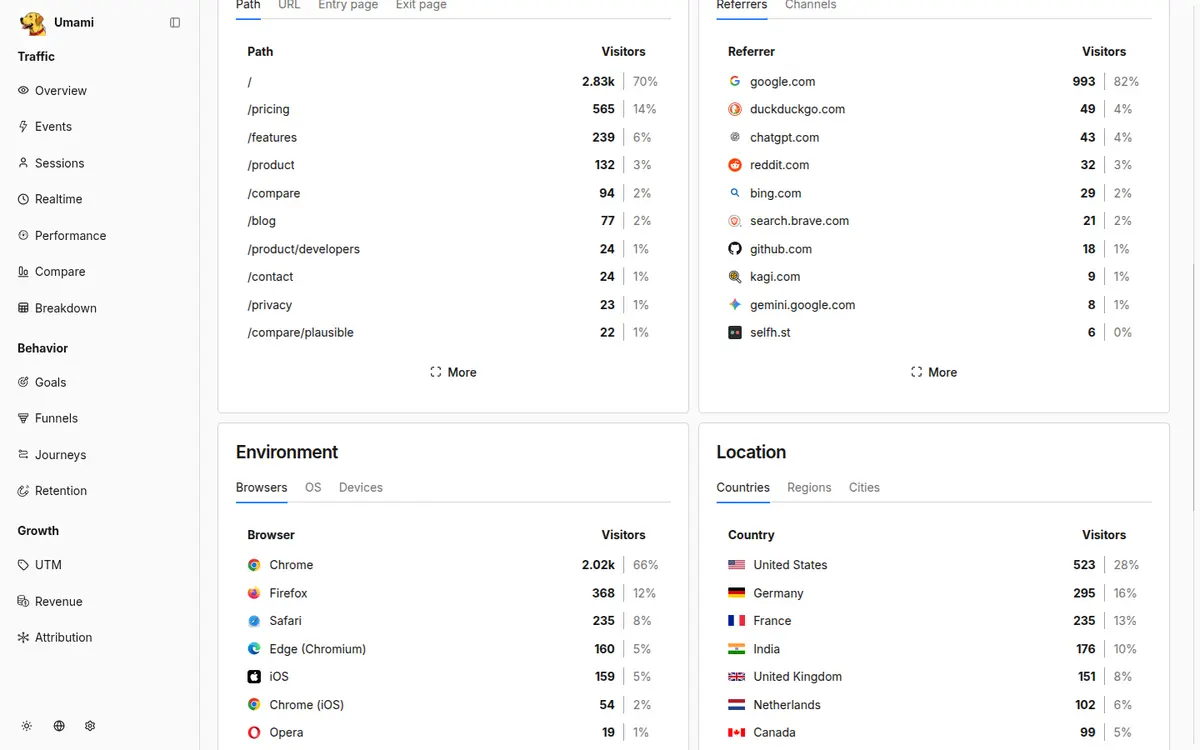
For decision-makers, this list answers a budget question: which channels actually bring visitors, and how do they compare to each other? If LinkedIn activity eats a lot of working hours but delivers hardly any visits, it shows up here in black and white.
You track campaigns via UTM parameters, which Umami evaluates automatically. A newsletter link with utm_source and utm_campaign appears cleanly separated from organic traffic. How you build a dedicated segment from the AI referrers and interpret the numbers is what our post on AI referrals describes step by step.
What you lose by switching
Honesty belongs in every tool comparison, so here is the loss side. First, campaign attribution: Umami assigns a conversion to the source of that particular visit. If you steer budgets across several paid channels and want to know which first contact triggered an inquiry three weeks later, you will not get that answer here.
Second, demographic data. Age, gender and interest categories disappear. That hurts less than it sounds: in GA4, those values came from Google's advertising profiles and were modelled rather than measured. In our experience, they were rarely what guided B2B decisions.
Third, user-level long-term journeys and remarketing lists. Without profiles, there is no recognition across months and no export to advertising platforms.
Our rule of thumb from projects: if you put a large share of your marketing budget into paid channels and genuinely use multi-channel attribution, do the math carefully before switching. For the typical mid-sized corporate website, the loss list is bearable.
Events and funnels: measuring conversions without cookies
Visitor numbers alone do not justify a marketing budget. The real question is what visitors do. For that, Umami offers events and funnels, both without cookies.
An event is a countable action. Three examples we set up on B2B websites as standard:
1. Contact form submitted. The strongest signal; in Umami, a data attribute on the submit button is all it takes. 2. Whitepaper or guide downloaded. An early indicator: anyone pulling a PDF is researching seriously. 3. Phone number clicked. On mobile devices, often the most frequent conversion, and still invisible in many statistics.
Funnels chain such steps together. A typical funnel: service page, reference project, contact form opened, form submitted. Umami shows how many visitors drop off at each stage. If 80 percent are lost between opening and submitting, the problem lies in the form and not in the traffic.
A practical tip on discipline: create at most five to eight events and name them according to a fixed scheme, for example contact-form-submitted instead of Event17. In projects we regularly see GA4 setups with dozens of events that nobody can explain anymore. The tool switch is the best opportunity for this spring cleaning.
Privacy assessment: cookieless does not mean rule-free
A common misconception goes: no cookies, no obligations. It is not that simple. One important note up front: we are not legal advisors, and the following points do not replace a legal review.
The privacy policy remains mandatory. Even anonymised web analytics is a processing operation that you must describe transparently: the tool used, the purpose, the storage location.
The consent banner question turns on Section 25 of the German TDDDG (the law governing access to information on end devices, formerly known as the TTDSG): consent is required from anyone who stores or reads information on the user's device. In our reading, which matches common vendor practice, a tool that sets no cookies and reads no device information does not fall under this obligation. We are not aware of a supreme court decision on this specific point. If in doubt, have your concrete setup reviewed.
Self-hosted, data sovereignty stays entirely in-house. With the cloud variant, a data processing agreement (AVV) is added; more on that in the FAQ at the end.
Is Umami really allowed without a consent banner?
For pure analytics with Umami in its default configuration, our assessment is that you need no banner, because no cookies are set and no device information is read. That is the reading widely shared in the industry, but it is not legal advice. If you run additional services alongside it, such as advertising pixels or embedded videos, a banner may still be required for other reasons.
What happens to the historical GA4 data?
It remains in GA4 as long as the property exists, but it cannot be imported into Umami. Our recommendation: export the most important annual reports as spreadsheets before you retire the property, and accept a break in the time series. Because of the consent loss, the old numbers were not comparable with the new ones anyway.
Do we need a data processing agreement?
Not for self-hosting on your own infrastructure, because there is no external processor; you usually already have the contract with your server's hosting provider. With Umami Cloud or when an agency operates it for you, a data processing agreement (AVV) is part of the package. That is standard paperwork, not a project risk.
Does Umami work with Drupal?
Yes. Umami is embedded via a single script that fits any CMS; for Drupal there is also a ready-made module. You add events via data attributes directly in templates or components. A curiosity on the side: the official Drupal demo is also called Umami. The two have nothing to do with each other.
Switching in practice: three steps
1. Run both in parallel (1 to 2 months). Add the new tool alongside the old one and compare the numbers. Expect noticeably higher visitor counts in the cookieless tool; that is the consent loss that was invisible before. 2. Define KPIs and events. Set up conversion goals (forms, calls, downloads) as events. This is the opportunity to drop legacy metrics nobody reads. 3. Switch off the old tool and update your privacy policy. Only then adjust or remove the consent banner.
Effort in our projects: a few person-days, depending on the number of events. If you want to know whether the switch pays off for your website, we will look at your current setup as part of the Future Check.
Go deeper in our knowledge base
Want to know what these topics mean for your company? The Future Check shows you the biggest levers within 2–4 weeks.